How Acumatica Pricing Works
Acumatica pricing depends on the functionality, capacity, and deployment option your business needs. This page provides general pricing guidance to help you understand the potential investment before beginning an evaluation.
Subscription Licensing Overview
Two subscription options to consider:
SaaS Subscription
Includes ERP software, hosting, security, backups, and system maintenance in one predictable fee.
Private Cloud Subscription (PCS)
An alternative for businesses that want to host and manage Acumatica in their own environment or with a hosting partner.
What Determines Your Acumatica Cost
Your subscription cost depends on four main factors:
Edition Level
Essentials, Select, Prime, and Enterprise offer different capacity and licensing options. The right level depends on your requirements, expected usage, and plans for growth.
Industry Edition
Industry-specific functionality for construction, distribution, retail, manufacturing, professional services, or general business, so you pay for the tools your business uses.
Usage Tier (CTV)
Acumatica does not charge individually for each transaction. Your usage tier is based on the highest monthly count for any one transaction type, such as sales orders, invoices, payments, or shipments, not the combined total across all types.
See how usage tiers workAdditional Functionality
Add modules such as Fixed Assets, Expense Management, and CRM when you need them, without taking on everything upfront.
Right-Size Your Capacity
Start with the capacity your business needs today, with room to move to a higher usage tier as your needs grow.
Scalability
Acumatica can grow with your business. Add modules, increase capacity, or move to a higher edition as your requirements change, all on the same core ERP platform.
Acumatica Edition Levels
All four editions run on the same Acumatica platform, so you can start with the level that fits today and move up as your requirements change.
Essentials
Includes 5 named users, expandable to 10. Businesses that need unlimited users typically move to Select.
Select
Unlimited users for small organizations that need advanced financial capabilities and more robust ERP functionality.
Acumatica Packaging at a Glance
How the four edition levels, the industry editions, and the reserved resource options fit together.
Source: Acumatica Licensing Guide, April 2026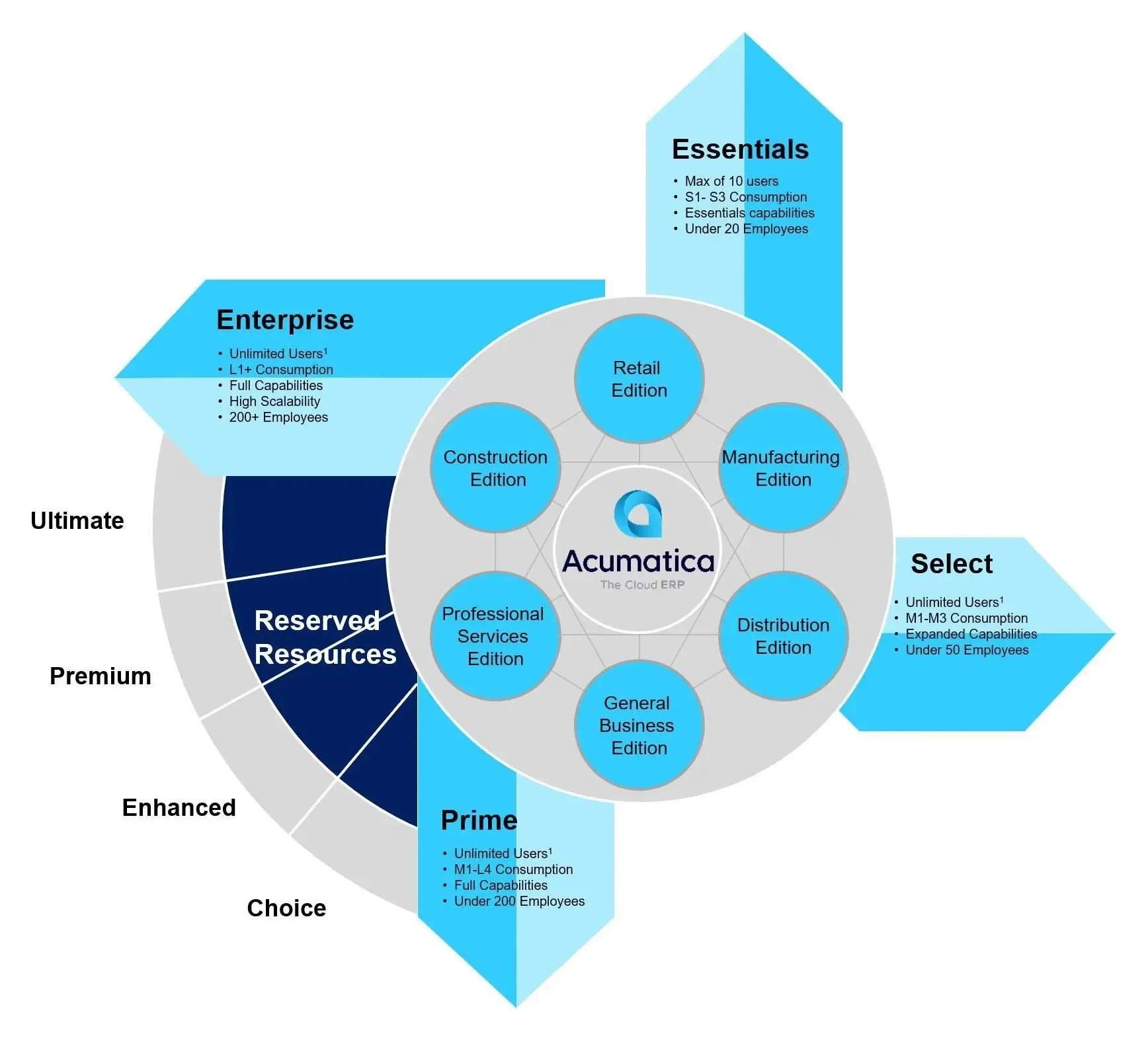
Not sure which edition fits?
Talk with MilestoneAcumatica Industry Editions
Acumatica starts with the same core platform, then adds industry-specific applications based on how your business operates.
Construction
For contractors, builders, and specialty trades. Supports job costing, subcontract management, change orders, billing, and field workflows.
Explore Acumatica Construction ERPDistribution
For wholesalers and inventory-focused businesses. Supports inventory, purchasing, sales orders, warehouse management, and fulfillment.
Explore Acumatica Distribution ERPRetail
For online retailers and ecommerce businesses. Supports ecommerce integration, inventory, order management, and fulfillment.
Manufacturing
For make-to-stock, make-to-order, and engineer-to-order operations. Supports BOMs, MRP, production management, scheduling, and shop floor activity.
Explore Acumatica Manufacturing ERPProfessional Services
For consulting, engineering, IT, and other project-based firms. Supports project accounting, resource planning, billing, and financial reporting.
Explore Professional Services ERPGeneral Business
For businesses that do not need a specialized industry edition. Supports financial management, reporting, CRM, and other applications based on your requirements.
Explore Financial ManagementYour industry edition helps determine the applications and functionality included in your Acumatica solution and plays a role in overall subscription cost.
Where to Start Your Acumatica Software Budget
If you are researching Acumatica, the figures below provide a budgetary starting point for planning your annual software costs. Your subscription may cost less or more depending on your requirements and configuration.
Construction, Distribution, Professional Services, and General Business
| Essentials5 named users, expandable to 10 | Annual Budgetary Starting PointAround$13,000/year |
| SelectUnlimited users | Annual Budgetary Starting PointAround$30,000/year |
| PrimeUnlimited users | Annual Budgetary Starting PointAround$40,000/year |
| EnterpriseUnlimited users | Contact Milestone for budget guidance |
Manufacturing
| Essentials5 named users, expandable to 10 | Annual Budgetary Starting PointAround$25,000/year |
| SelectUnlimited users | Annual Budgetary Starting PointAround$48,000/year |
| PrimeUnlimited users | Annual Budgetary Starting PointAround$60,000/year |
| EnterpriseUnlimited users | Contact Milestone for budget guidance |
See a budget range for your business. Answer eight quick questions in the Acumatica Pricing Calculator to get a suggested edition plus software and implementation ranges for your industry and size.
Budgeting guideline: These figures are for initial planning and do not represent minimum prices or a quote. Final subscription costs depend on your industry edition, usage tier, selected modules, and deployment option. Implementation, data migration, training, and ongoing support should also be considered in your overall ERP budget.
Schedule a Discovery Call to talk through your budget and requirements.
How Acumatica Usage Tiers (CTV) Work
Under Acumatica’s consumption-based licensing model, your usage tier is determined by CTV (Commercial Transaction Volume): the highest monthly count for any one counted transaction type, not the combined total across all transaction types.
Counted transaction types
- Orders & ReceiptsSales Orders, Purchase Orders, Purchase Receipts
- InvoicesAR Invoices, AP Bills
- PaymentsCustomer Payments, AP Payments
- ShipmentsShipments
Each transaction type is counted on its own. For example, AR Invoices and AP Bills are not added together.
Example: Company A, busiest month
The highest monthly count is 720 AR Invoices, so Company A’s monthly CTV is 720, not the combined total of all transaction types shown. That CTV determines the appropriate usage tier.
Planning Your Implementation Budget
Your subscription covers the software. Implementation is a separate, one-time investment to set up Acumatica, migrate your data, connect key applications, and train your team. These guidelines help you plan a budget.
A common budgeting guideline is to set aside 1.5× to 2× your first-year software subscription for implementation. Treat it as a planning number, not a quote. Your final cost depends on your scope and requirements.
What Shapes Your Implementation Budget
Project Scope
The processes, departments, and workflows included.
Data Migration
How much historical data needs to be cleaned, converted, and validated.
Integrations
Connections to payroll, ecommerce, CRM, or other systems.
Reporting & Configuration
Dashboards, reports, workflows, and approvals.
Training & Go-Live Support
Training, testing, cutover planning, and support after go-live.
Getting ready for an implementation?
Read the ERP Implementation GuideSchedule a Discovery Call to build a budget around your project scope.
Is Acumatica Right for Your Business?
Pricing gives you a starting point, but the first question is whether Acumatica supports the way your business works. These are the areas that shape both fit and cost:
- Operational needsThe daily processes your team depends on and what is getting harder to manage with your current software.
- Industry fitWhich industry edition matches how your business operates: Construction, Distribution, Retail, Manufacturing, Professional Services, or General Business.
- Modules and systemsThe applications you need now, what can be added later, and which existing systems need to connect with Acumatica.
- Transaction volumeYour busiest-month transaction counts, which help determine your usage tier.
Start With a Conversation About Fit
Milestone helps determine the right edition, modules, expected usage, and implementation scope, so your estimate reflects how your business operates.
Acumatica Pricing FAQ
Clear answers to common questions about Acumatica pricing, usage tiers, implementation costs, and how your subscription scales as your business grows.